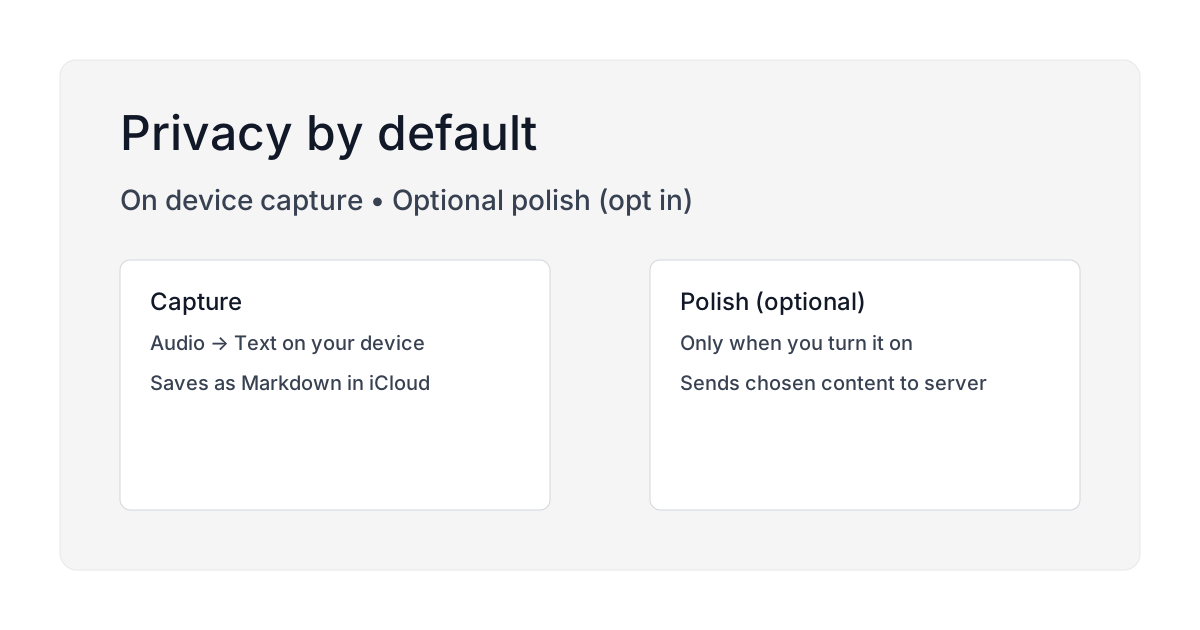
 Caption: Capture runs on your device by default. Optional polish is opt-in.
Say you take session notes between clients: observations, patterns, follow-up items. Nothing that names a patient, but sensitive enough that where the audio goes is a real question. With most transcription apps the only way to answer it is to read the privacy policy closely, and most people install first and read later.
People do ask, in public. On r/privacy, someone asked for "a privacy-focused text to speech app on iPhone" because enabling Apple dictation "explicitly says it sends anonymous transcripts to Apple." Another user searched for local-only transcription: "I would rather use a program that can be downloaded to a computer so the audio file can stay local, as opposed to uploading to the cloud where god knows what will happen to it."
Those are the questions this page answers. They are also why privacy is the default in Brain Dump, not an upgrade feature.
The question nobody asks until it's too late
When you record a voice note, where does the audio go?
Most people assume it stays on their phone. But with many transcription apps, the audio gets uploaded to a server for processing. The transcription happens in the cloud, the text comes back to your phone, and the audio... who knows.
Maybe it's deleted immediately. Maybe it's kept for 30 days for "quality improvement." Maybe it goes into a training dataset for the next AI model.
You don't know. And that's the problem.
How Brain Dump handles your data by default
Transcription runs on your device. When you speak into Brain Dump, a speech-to-text engine bundled inside the app converts your voice to text. It is a whisper.cpp build that ships with the app, not Apple's dictation and not a web service. The audio never leaves your phone. No upload, no server, no third party processing your words.
Notes save to your iCloud, not ours. The text file gets saved as a Markdown file in your Brain Dump folder in iCloud Drive. That's your iCloud account, not a database we control. You can open it in Files, Obsidian, VS Code, any text editor.
We don't see your notes. Because files live in your iCloud, we have no access to them. No database storing your thoughts. No analytics tracking what you write about. Your notes are yours.
This isn't a privacy mode you have to enable. It's how the app works by default.
A day in the life of your voice note
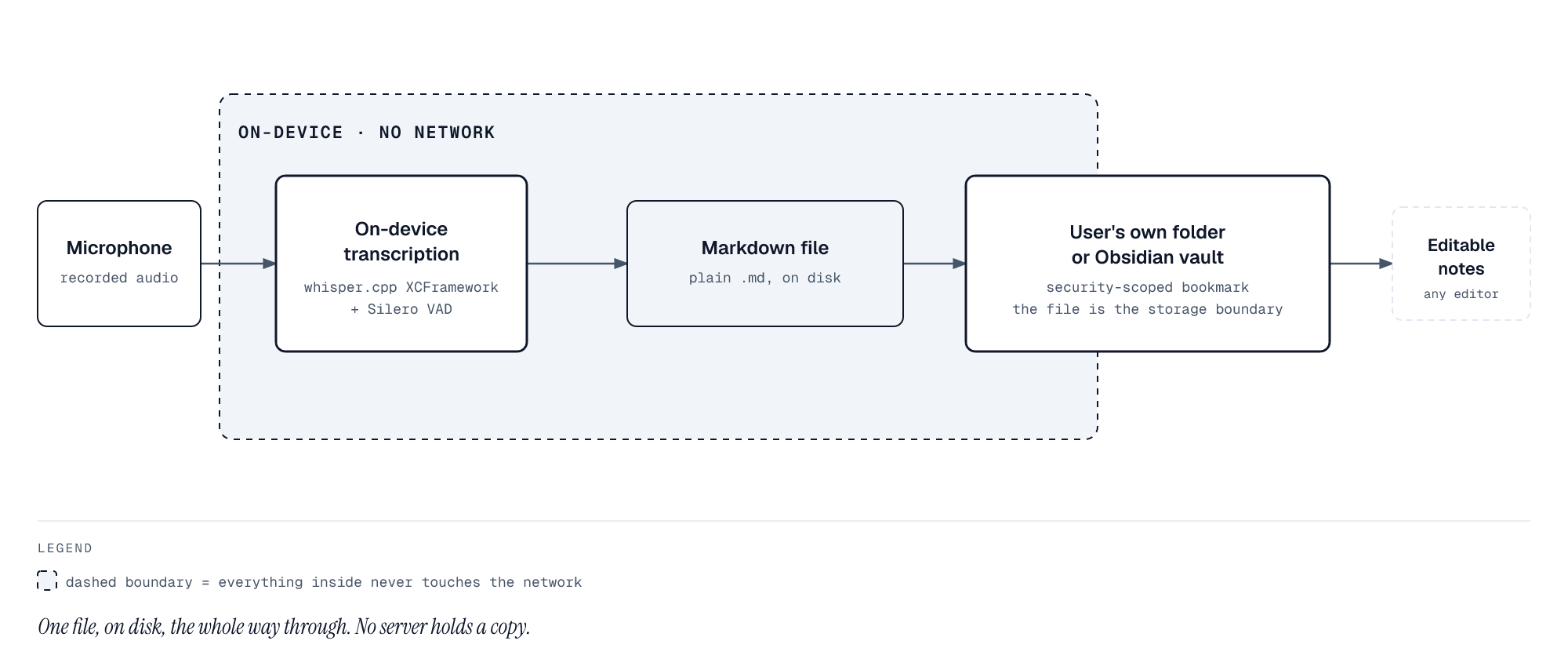
Every arrow in that diagram stays on the device. There is no step where the audio or the text crosses the network.
Here's what actually happens when you record:
- You open Brain Dump and tap record.
- You speak for a minute about whatever's on your mind.
- Your iPhone converts audio to text using the Neural Engine, the same chip that processes Face ID.
- The app writes a Markdown file to
iCloud Drive/Brain Dump/[filename].md. - If you're online, iCloud syncs the file to your other devices. If you're offline, it syncs later.
At no point does the audio or text leave your device unless you explicitly choose a polish feature.
When polish changes the equation
Brain Dump has optional AI features: summary, action items, rewrite. These can clean up a messy brain dump or extract key points.
These features are off by default. You have to enable them in settings. And even then, they only run when you tap a polish button.
When you use polish:
- The text content of that specific note gets sent to an AI provider (you can choose which one in settings).
- The AI processes it and returns polished text.
- You can delete the polished version if you don't want it.
The important part: you choose when this happens. It's never automatic. And the raw capture never goes through AI: only the text you explicitly ask to polish.
What the session-notes case actually needs
Go back to the scenario above. Sensitive notes dictated between appointments need three things, and the architecture either provides them or it does not:
-
Nothing sensitive on a server. On-device transcription means the observations never travel. There is no retention window to reason about, because there is no upload.
-
It works with no network. Between appointments, wifi is not a given. Airplane Mode capture means the tool does not depend on connectivity.
-
The files stay yours. Markdown in your own iCloud means you can back it up, move it, or delete it without asking anyone. No company is holding the notes.
Brain Dump is built for those three constraints, which is why it is the same set of guarantees today as on day one.
The questions people actually ask
"Can't Apple still see my data since it's in iCloud?" Your iCloud data is encrypted. Apple has your encryption keys for standard iCloud (they need them to help if you forget your password), but they're not reading your notes. If you want even stronger guarantees, enable Advanced Data Protection in iCloud settings. That removes Apple's ability to decrypt your data.
"What if I want to use AI polish sometimes?" Use it. That's why it exists. Just know that when you press that button, that specific note's text gets sent for processing. You're making an explicit choice to trade privacy for convenience in that moment.
"How is on-device transcription possible?" Apple ships speech recognition models on the iPhone itself. On supported devices running iOS 15 or later, dictation runs locally on the Neural Engine, fast enough to keep up with speech. No cloud needed.
"Is Airplane Mode transcription really accurate?" It uses the same on-device model as any other capture, so the network state does not change the transcript. Airplane Mode removes the connection, not the recogniser. See offline capture guide for details.
"What happens if Brain Dump shuts down?" Your notes are Markdown files in your iCloud. The app could disappear tomorrow and you'd still have every note. Open them with any text editor, Obsidian, VS Code, whatever. No lock-in.
Why we built it this way
We could have made an easier product. Send everything to the cloud, transcribe on servers we control, offer unlimited polish features, store everything in a database.
But that would mean:
- You'd have to trust us with your notes
- We'd have to secure a database full of people's private thoughts
- You'd be locked into our ecosystem
- Your notes would be vulnerable if we got hacked
File-based, on-device transcription is harder to build. But it's the right architecture for a tool that holds your thoughts.
You shouldn't have to choose between convenience and privacy. With modern iPhones, you can have both.
The privacy promise
Brain Dump defaults to on-device everything:
- Transcription happens on your iPhone
- Notes live in your iCloud, not our database
- Audio never leaves your device during capture
- Optional polish is off until you turn it on
If you want to verify this yourself:
- Put your phone in Airplane Mode
- Record a voice note in Brain Dump
- Watch the text appear instantly
If it works offline, it's not hitting a server. That's the simplest privacy test.
Learn more:
- Privacy Policy: the legal version of this article
- Plain text vs databases: why files beat proprietary storage
- Offline capture guide: how to use Brain Dump without internet
Download: Brain Dump on the App Store. Privacy by default, polish when you want it.