This snapshot compares on device and cloud speech approaches for note capture, and sets out the response-time threshold that decides which one you can think through.
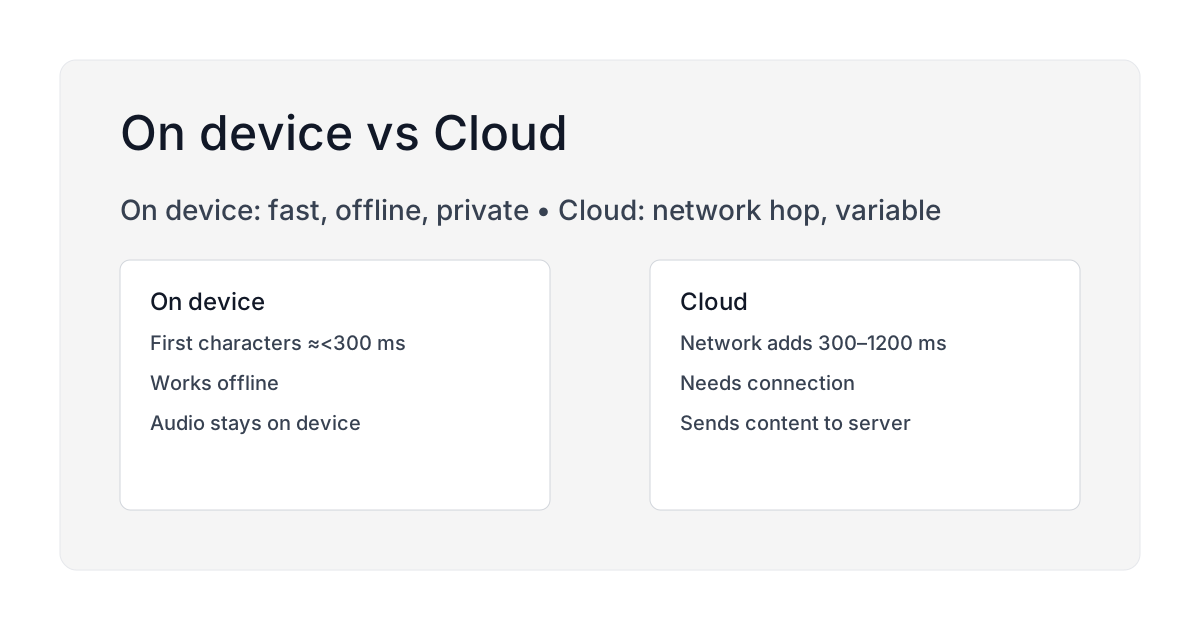 Caption: On device is fast, private, and works offline. Cloud adds a network hop and varies with connection.
TL;DR
- On device: lowest latency, works offline, best for privacy.
- Cloud: may improve accuracy in some noise. Needs network and may send data.
- Brain Dump: on device first, using a bundled whisper.cpp model. Optional polish can be enabled later.
- The number to beat is about one second to first character. Past that, the thought goes.
Where the time goes
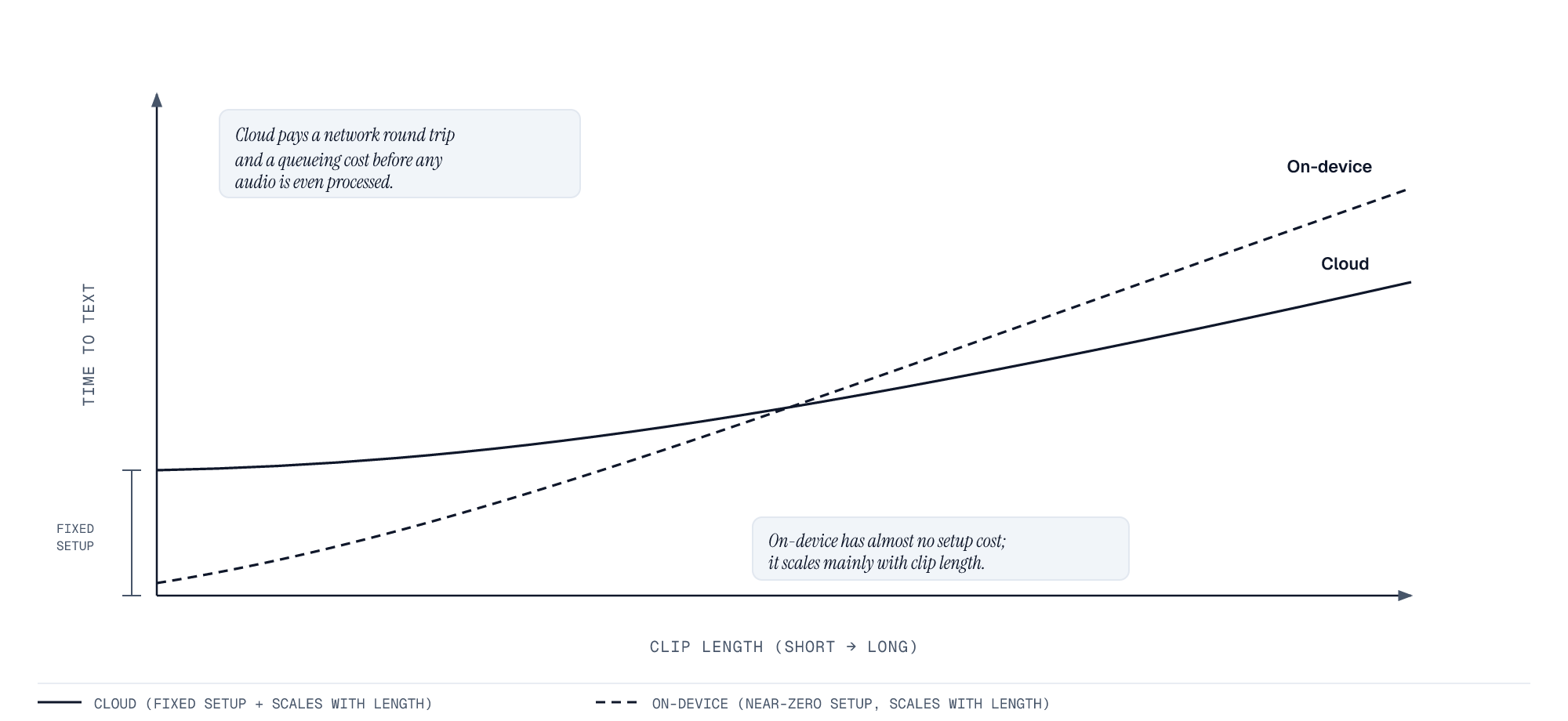
The axes carry no numbers on purpose. We have not published our own millisecond measurements, and the shape of the relationship is the part that decides which approach wins.
We have not published our own millisecond measurements, so this section describes the work each approach has to do rather than a number we cannot back.
On device, the path is short. Audio goes from the mic into a recogniser running on the same chip, and partial results return while you are still talking. Nothing is uploaded, so nothing waits on a network. Brain Dump's on-device path runs a bundled whisper.cpp model for this, not Apple's own dictation engine; Apple's Speech framework is the equivalent on-device API for apps built on Apple's own stack instead.
Cloud adds fixed steps that on device does not have: the audio has to reach a server, wait its turn there, and the text has to come back. That round trip is bounded by your connection, not by the model, which is why cloud latency is inconsistent in exactly the places people journal: a moving train, a lift, a busy cafe network. On a good connection the gap can be small. The point is that it varies, and on device does not.
As a point of comparison, on-device speech models generally have caught up on accuracy without giving up speed: Apple's own SpeechAnalyzer framework matches mid-tier Whisper models while running entirely on-device, and 9to5Mac testing found it about twice as fast as MacWhisper running Large V3 Turbo. That is Apple's own engine, not Brain Dump's, cited here to show the on-device category as a whole is no longer a speed-for-accuracy tradeoff.
The threshold that decides it
Latency in dictation is not a stopwatch problem, it is an attention problem, and the size of the acceptable delay was settled long before voice notes existed.
Robert Miller's 1968 study of man-computer conversational transactions set out three thresholds that still hold. Under 0.1 seconds, a response feels instantaneous, with no perceptible gap. Up to about 1 second, the delay is noticeable but the flow of thought stays unbroken. Past that, attention shifts off the task. Stuart Card, George Robertson and Jock Mackinlay confirmed the same limits at CHI in 1991, and Jakob Nielsen's summary states it plainly: 0.1 seconds feels instant, 1 second keeps the flow of thought intact, 10 seconds is the outer limit before people give up and do something else.
Voice capture lives inside that 1-second limit. While transcribed characters keep appearing before you have finished forming the next phrase, your brain treats the tool as keeping pace and you never look at it. Once there is a visible gap, the checking starts: did it hear me, is it still recording, should I say that again. That shift is what loses the sentence, not the milliseconds themselves.
Two delays do the damage:
Time to first character. The gap between starting to speak and seeing the first word. Miller's one-second line is the point where people stop trusting the tool and start re-recording.
Jitter. When speed swings unpredictably, there is no threshold to adapt to, so you record defensively and speak slower than natural. Consistent speed matters more than peak speed, which is the specific thing a network round trip cannot promise.
This is the practical case for on device. Words appear as you speak them, on a plane or underground or on a bad hotel network, so the app never asks for your attention back.
Five fixes that shorten the gap
1. Use on-device transcription
A network round trip costs hundreds of milliseconds before the model has done anything. On-device transcription removes that path entirely. Brain Dump transcribes with a bundled whisper.cpp model on device by default, so there is no upload and no network dependency during capture.
2. Position the mic correctly
Holding the phone against your ear like a call is the worst case. The usable range is 15 to 25 cm from your mouth with the microphone facing you: closer gives muffled plosives, further lets background noise compete. Face away from wind, because even a light breeze across the mic adds noise the model has to work through. More detail in the mic guide.
3. Speak in short sentences
Natural pauses give the model clean segmentation points. Long unbroken sentences force it to hold context longer before committing to word boundaries. Speaking the way you write, in short sentences with clear breaks, is faster and more accurate at the same time.
4. Close competing apps
Several apps contending for the microphone, or a loaded CPU, slows transcription measurably. This shows up most on iPhone 12 and earlier. Swiping away unused apps before an important recording is worth the two seconds.
5. Keep polish separate from capture
Some apps transcribe and clean up in one pass, sending your text to a model before showing you anything. It reads well in a demo and it adds the exact delay this page is about. Brain Dump splits the two: capture is local and immediate, polish is optional and happens afterwards.
Test your own setup in 60 seconds
- Open your transcription app and start recording.
- Say a title first, then read three short sentences aloud.
- Watch for the moment the first character appears.
- Repeat the same test in Airplane Mode.
If offline is faster, your bottleneck is the network and an on-device tool will fix it. If it is still slow offline, the app is doing too much work before it shows you anything, and no connection will save it.
Privacy
With on device transcription, audio stays on your device. Optional polish runs only if you switch it on. See our privacy policy and Key facts.
When to pick which
- On device: journaling, sensitive notes, low connectivity environments.
- Cloud: specialized vocab at the cost of connectivity and potential data transfer.
Accuracy in the real world
Cloud can help with rare jargon in some setups. But most accuracy losses come from wind, distance, or echo, not from the model. Fix the mic first, and try wired EarPods while moving.
Related: offline capture in Airplane Mode, wired vs wireless mics for dictation, and hands-free capture in the car.